DJI Air 3: Mid Term Review

I don't write gear reviews after a weekend with a product. I write them after I've trusted my gear when it actually mattered. The DJI Air 3 has now been through many of those moments with me, and what I learned wasn't what I expected going in.
Four months have passed since I got my hands on this drone, and I've had the chance to put it through its paces across three shoots that actually mattered to me. I haven't flown it as often as I'd have liked — more on why later — but what follows is everything I've learned along the way, plus the full specs for anyone trying to decide if this is the right drone for their kit.
Where the Air 3 Sits in DJI's Lineup
If you're not already familiar with where this drone fits, here's the short version.
The Air 3 sits squarely in the middle of DJI's range — more capable than the entry-level Mini series, but a clear step below the flagship Mavic 3 and Inspire lines. Above the Minis, you're getting significantly better camera quality, longer flight time, and proper omnidirectional obstacle avoidance meaningfully — the kind of capability that starts to matter once you're shooting for clients or for a print, not just for Instagram. Below the Mavic 3 and Inspire series, you're missing out on the larger sensors, the absolute top-tier image quality, and the professional-grade build those drones are designed for.
That middle ground is exactly where the Air 3 earns its keep. It's the drone DJI built for enthusiasts and semi-professionals who want serious image quality and flight performance without stepping up to Mavic money. In Canada, it runs approximately $1,200 CAD for the standard kit, with the Fly More Combo — which you'll want, more on that below — priced at around $1,600 CAD.
One thing worth flagging since I wrote this: DJI has since released the Air 3S, which bumps the wide-angle sensor up to a full 1-inch CMOS (from the Air 3's 1/1.3-inch), adds forward-facing LiDAR for night flying, and pushes dynamic range to 14 stops. If you're buying today and the price gap doesn't put you off, it's worth cross-shopping. But everything below still holds for the Air 3, and at this point, there are excellent deals to be had on it now that it's not the newest kid on the block.
Full Specifications DJI Air 3
Weight~720g (under the 250g "recreational exemption" threshold — registration required)
Folded dimensions. 214 x 100 x 91 mm
Wide-angle camera. 1/1.3" CMOS, 48MP, 24mm equivalent
Medium tele camera 1/1.3" CMOS, 48MP, 70mm equivalent
Video (wide) 4K/60fps HDR, dual native ISO
Video (tele) 4K/60fps HDR
Colour modes 10-bit D-Log M, 10-bit HLG
Photo resolution. 12MP (pixel-binned) or 48MP (full resolution)
Max flight time (DJI claimed). 46 minutes
Max flight time (my real-world experience) 38–40 minutes
Obstacle avoidance Omnidirectional binocular vision + infrared, APAS 5.0
Subject tracking ActiveTrack 5.0, tracks in 8 directions
Video transmission O4, up to 20km range
Wind resistance. Up to 12 m/s
Price (Canada) ~$1,200 CAD standard / ~$1,600 CAD Fly More Combo
Price UAE - AED 3250 BASE / AED 5299 FLY MORE COMBO WITH RC2 REMOTE
Setup and First Flight
Unboxing, fitting the rotor blades, and getting the drone and controller paired for their first flight took me about half an hour, start to finish. The setup process involves activating the controller — which needs a Wi-Fi connection — and linking it to the aircraft. Budget extra time here, because you'll almost certainly need to update firmware on both the controller and the drone before you're airborne.
The Learning Curve: DJI Fly App and the RC2 Controller
Here's my honest advice, even if you've flown DJI drones before: read the manual, and spend real time in the DJI Fly app before your first serious shoot. The Air 3 has a genuinely deep set of features and settings, and they are not always intuitively placed. I'd rather tell you that upfront than have you discover it mid-flight.
One thing to change immediately — the camera ships set to shoot video in HD. If you want 4K, and you almost certainly do, go into the settings before you take off.
It's also worth properly learning the Quickshots and Mastershots features, and in particular the tracking mode — this is one of the best tools on this drone for solo creators, letting you set the Air 3 to follow your movement on foot or track a moving vehicle. It took me about three shoots and a few dedicated hours in the app before I felt like I actually understood what this drone was capable of. As with any creative tool, the time you invest in learning it is directly proportional to what you get back out of it.
The RC2 controller itself I have no complaints about. The screen is bright and stayed genuinely readable in every lighting condition I flew in, and the controls are customizable enough to suit your dominant hand.
The Cameras
This is where the Air 3 actually differentiates itself, and it's worth going into some depth.
You get two cameras: a 24mm wide-angle and a 70mm medium telephoto, both built around a 1/1.3-inch CMOS sensor, and both capable of shooting in either 12MP or 48MP mode. That dual-resolution choice isn't just a spec-sheet flex — it's genuinely useful:
48MP mode is what you reach for when you need maximum detail — landscape work, anything you might crop into or print large. This is the mode I use almost exclusively for stills, given what ends up in my print store started life as a RAW file, not a JPEG meant for a phone screen.
12MP mode uses pixel binning — combining four adjacent pixels into one larger one — which meaningfully improves low-light performance and dynamic range. This is your mode for golden hour, blue hour, or anything with challenging contrast.
Having both cameras also means you're not choosing between wide drama and compressed intimacy — the 24mm captures the sweeping landscape, and the 70mm gives you that flattened, telephoto perspective for a completely different kind of shot, all without changing lenses, obviously, because it's a drone.
Video-wise, both cameras shoot 4K/60fps HDR, support 10-bit D-Log M for proper color grading flexibility in post, and the wide camera specifically benefits from dual native ISO — which in plain terms means richer, more natural-looking footage in mixed or difficult lighting, without the video looking obviously processed to compensate.
Obstacle Avoidance
The more I flew the Air 3, the more I came to trust this system. It uses an omnidirectional binocular vision setup, backed by an infrared sensor, running DJI's APAS 5.0 avoidance. In practice, this let me focus entirely on composition and framing rather than constantly worrying about what was behind or beside the aircraft. Paired with ActiveTrack 5.0 — which tracks subjects across eight directions — following a subject with genuine precision stopped feeling like a skill I needed to develop and started feeling like something the drone just handled.
Battery Performance
DJI rates the Air 3 at 46 minutes of flight time. In real-world use — active flying, some wind, actually working the drone rather than just hovering for a spec-sheet test — I consistently got 38 to 40 minutes. That's still genuinely impressive, and enough runway to properly scout a location, nail the shot, and get home with margin to spare.
Portability
At roughly 720 grams folded down to 214 x 100 x 91mm, the Air 3 is compact enough that I bring it along whenever local regulations allow — which, depending on where you're shooting in Canada or the US, is worth checking before you assume you can just show up and fly.
My one genuine gripe is the included carrying case. It's a touch cramped getting the drone in and out, and the arms and propellers have a habit of snagging if you're not careful. I'm seriously considering a separate case for the drone and accessories — not a dealbreaker, but worth knowing before you rely on the stock case as your primary transport solution.
The Shots That Made It Worth It
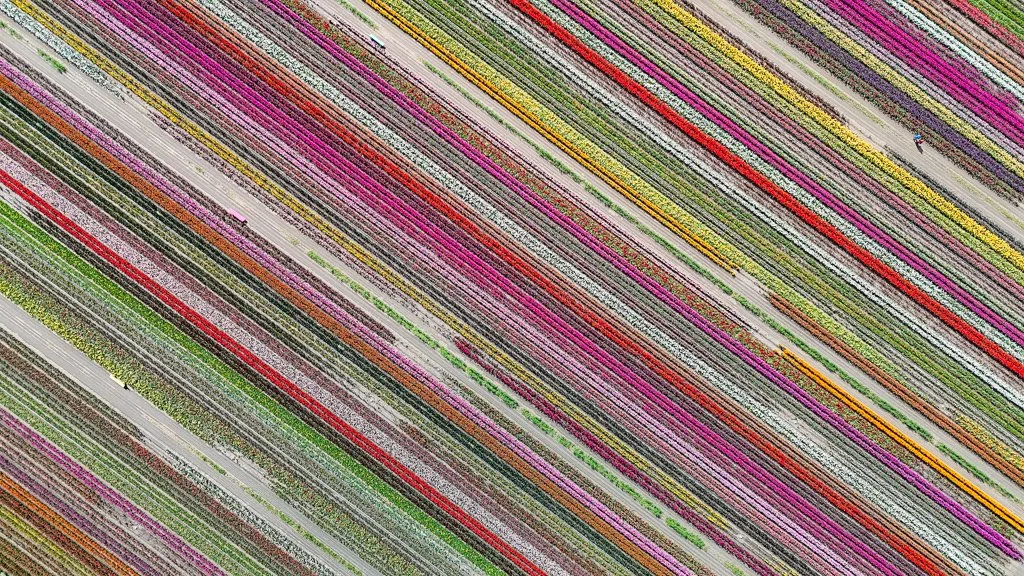
Colourful Patterns of Tulip Fields captured by DJI AIR 3
Two moments stand out from these past four months.
The first was an early flight over the tulip fields near Vancouver, BC — genuinely great images and footage, and a strong early sign of what this drone could do.
But the shot that's stayed with me was a sunrise flight over the rolling meadows of the Palouse in Eastern Washington, with the Air 3 tracking my vehicle as I drove. The light was golden, the air was crisp, and the drone performed exactly the way you hope your gear will perform in the moment that actually matters. That single flight is a big part of why I trust this drone now in a way I didn't after the first few outings.
Moments like that are the real reason I do this. It's not really about the drone as a piece of technology — it's about what it lets you reach that you couldn't reach on foot or from the ground. Whether you're well into your career or just starting to explore aerial work, the Air 3 has genuine potential to change your creative workflow, not just supplement it.
Who Is This Drone For?
So — is it worth it? Honestly, it depends on what kind of flying you're doing.
If you're a serious creator who wants strong image quality without the Mavic-tier price, and you're willing to go through the licensing process required to fly legally in Canada (and equivalent regulations elsewhere), this is an easy recommendation.
If you're a hobbyist who doesn't want the hassle of licensing and the regulatory overhead that comes with a drone this size, look instead at the Mini series, or DJI's newer Neo. I haven't gotten my hands on the Neo yet, but it's on my list.
No drone is without flaws, and the Air 3 has a few — the carrying case chief among them, along with a settings menu that rewards patience more than intuition. The protective plastic cover for the camera/gimbal is a bit fiddly and could be better. But for me, the pros comfortably outweigh the cons; I am impressed by and enjoy working with the DJI AIR 3. I have no hesitation in recommending it to anyone serious about taking their aerial work further.
Shot with the DJI Air 3 across British Columbia and Eastern Washington. If you've got questions about the setup or want to know more about the shots this drone made possible, drop a comment below.
Watch My Video Review Here
EXPLORE MY TRAVEL BLOGS